Showing posts with label C. Tv Advertising. Show all posts

Wednesday, 11 June 2014

Colman's Mustard Pre-Production Paperwork

Storyboards 


Production Schedule


Location Release 


Location Recce 


Risk Assessments

Budgeting
Talent Releases


Wednesday, 2 April 2014

Preparing Material for Editing

Logging On

When you log on you must use the username and password which is designated for your media block. The reason you use this log in is because your work will be saved onto a private database which has a much larger memory storage than the personal log ins. Although if the Mac (computer) which you work is stored on breaks, you could risk losing all of your work. 

SD Card Files

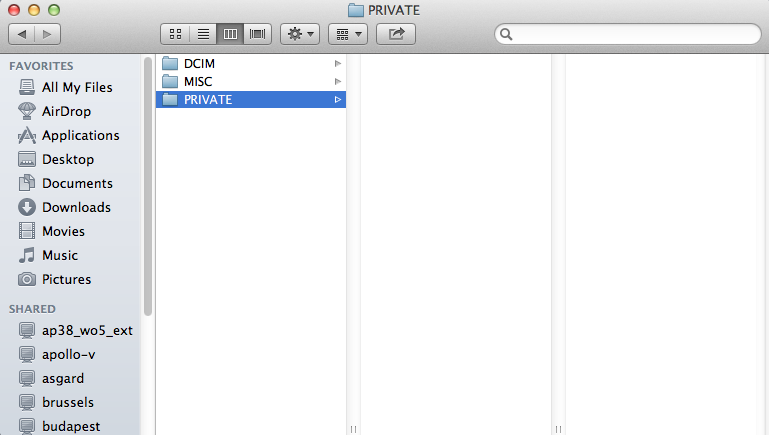
When you wish to import your work onto your desktop using an SD card, then you will need to know which file to import. When you import your SD card a small icon will appear on your desktop which looks like an SD card, my one on my desktop is named 'EOS_DIGITAL'. When you double click on this icon a series of folders will come up which include your work, the folder named 'PRIVATE' is the folder which you will need to copy onto 'Macintosh HD'. 


You will place the folder into 'Movies' in the 'mediae' folder. Below is the path you will need to follow to get there. The end folder named 'Mustard Ad'. We renamed the folder that is why it is no longer named 'PRIVATE'. If files have not been correctly copied over to the mac then you will be unable to use your footage unless the SD card is imported


Setting up a project

To set up your project on Adobe Premiere Pro, you will need to create a new project and link it to the folder which you made in movies. A tab with the title of 'New Sequence' will then appear and you will need to assure that you use the correct settings which is seen on Sequence Presets - AVCHD - 1080p - AVCHD 1080p25. 


Bins

Bins allow you to organize your project. It gives you the advantage of organizing your files into specific bins such as videos, audio, still images, etc. This will make it easy for you to find and access your specific clip audio or image needed. Adobe also allows you to create a bin which is already inside a bin to obtain organization.

Although bins may show your certain clips or photos that you have imported they wont actually be stored on premiere pro, if you then remove these certain files from your actual computer then premiere pro would also get rid of them because they are not stored on premiere pro, instead premiere pro is just allowing you to play and edit them. You must first of all properly import each clip onto your hard drive, this way they wont get deleted at a later date.   


You will need to make a copy of your project in the new folder you created in movies on the Mac so that you have a back-up. This also makes sure that you do not loose any of your project.


Paths

A path is the directory of where your work is stored on the Mac from the use of your organization skills to make sure the files needed for your project are easily accessible.


Tuesday, 4 March 2014

Technical Aspects of Editing

1. What do the numbers 16:9 refer to? 

The apsect ratio. 16 length/width - 9 height 
 
2. What is the frame size of a 1080p video file? 

1920 x 1080

3. If you have a video file which is 720:50p what is the frame rate and what does the p stand          for? 

50 Frames Per Second. 'p' stands for progressive

4. What is the difference between p and i? 

p- progressive i- interlaced. The designation of how the frames are shown. Progressive shows every frame one after another, whereas interlaced shows half of the frame at any one moment and interlaces these half frames together, this results in us seeing unified movement.

5. What frame rate is real film shot at? 

24fps (23.976)

6. What might be the advantage of shooting at a higher frame rate? 

The image will have a higher clarity, this works well with slow motion footage as there are more still images to scroll through. For example- a golfer practicing their swing. 

7. What defines a lossy file? 

A highly compressed file that loses unwanted and unnecessary information so that it has a smaller file size. hence the name lossy (loss) 
 
8. Name three file types commonly used in video editing. 

JPEG, MOV, AVCHD  

9. What is the difference between a video file type and a codec? 

File type holds all of the information and the codec is what read the information. 

10. What is bitrate?  

The rate at which a file processes information 

Monday, 3 March 2014

Colman's Mustard TV Advert Evaluation

Colman's Mustard

Introduction

For this assignment we had to choose a Unilever product which we could re-brand to a different target audience. The product which we chose to re-brand was originally Bovril, although we decided to change to Colman's Mustard. We changed our idea from Bovril because our original idea was too complicated. Re-branding Colman's Mustard was much easier because we could aim the product at a younger generation easier than we could Bovril.

We managed to create an advert which was humorous but at the same time got the message across that Colman's Mustard is not only for the older generation. This kind of advert would appeal more to the younger generation and the humour in this advert would of made them more interested in the product.

Our advert had very positive feedback within our class and from our teachers, so this showed that we had successfully made an appropriate advert, although the 'teens' in our group were not attracted more towards to product and said that they would not but mustard more because of our advert, then again those very few people from our class may be a small number who don't like it, but if it was actually on the television as an actual advert, it could help increase sales prices within the younger ages.

Editing Techniques

We used quite a few editing techniques within our advert, one of which was a pitch shifter from Adobe Premier Pro (the program which we used to edit or advert). This was used to change the pitch of the voices of the repeated "mustard" throughout most of the advert. We used this echoed effect to make the scene with the 'Mustard Man' seem tense and mad, because it sounded like lots of voices at once which came across as being quite confusing and disorientating. We used After Effects to create the 'squeezy' effect on the bottle at the end of the advert. The liquify filter allowed us to almost pinch the mustard several times, creating a squeeze looking affect on the still image of the bottle. The aesthetic qualities we used were realistic costumes and locations to re-brand this product. We used a tie and shirt on the protagonist  to bring a sense of authenticity which will lead the audience to believe in the advert, as well as the office-based location. To create an office-based location we used props such as laptops and mugs to again give a sense of realism within the advert.


The effectiveness of the persuasion techniques we used was firstly to get the audiences attention. We made a character in our advert (Mustard Man) repeat the word 'mustard' over and over again as he was in the scene, although this could be found either funny or annoying by some of the audience it will help to make the audience remember our product because they will of heard the word so much. We related the advert to the audience, we did this by setting our advert in an office, and by doing this many of the audience who are most probably middle-class would work in an office. This gives the audience features of their own life or character which they can relate to, which will make them more likely to watch and enjoy our advert. We also used desire as a technique to attempt to convince the audience of our new target audience (young professions) to buy this product. We did this buy featuring the male secretary in a real life situation which towards the end results in the message that Colman's Mustard is what gets men the ladies. Therefore this small yet simple shot will convince this target audience to buy this product.

Throughout our pre-production process, our aim for this advert was to communicate that even though mustard is seen as an unappealing product and a product that is only consumed by the older generation, that it is in fact a great on the go product for a work based environment. This is the reasoning for the starring of young workers and the humour which it brought to our advert through the 'mustard man'.

Overall we have presented the audience with a professional and non-offensive advert which was our aim beginning. We achieved this by using our knowledge to make our advert look as professional as possible which we did by using shot variations, for example we used close-ups, long shots and different angles to create a well made advert which was easy to watch We also used the continuity system as a guide to make sure we made no crucial continuity errors. Advertising regulations are also very important while creating any sort of production. As a group we went by UK's independent regulator ASA (ASA, 2014) and did not introduce anything harmful or offensive on our advert.

My view

In reference to our pre-production process and the final advert, there were very few things which we chose to shoot differently compared to our original intentions and storyboards. As we changed our idea and locations several times throughout the process, this involved re-starting our storyboard. The few things which we did decide to change in the final product was the mustard man outfit. We first planned to buy a bright yellow top and trousers but we later on decided to use a yellow poncho due to being slightly unorganised after having to start filming straight after half term. We also decided to use more appropriate shots while filming than we originally planned such as filming much of the advert from the left rather than straight ahead.

Conclusion

Our advert for Colman's Mustard personally I am extremely satisfied with. The standards of quality of our final product with only having made 2 previous productions are very good. The only thing that I would change is be more prepared and to not rush any process as while having a week to film, we managed to film our whole advert in one day, but unfortunately we had to re-shot certain scenes because they weren't quite right. The same apply's for the change in the product which we were re-branding as half way through the pre-production process we decided to re-brand a different Unilever product (Colman's Mustard). For our group I personally think that each of our involvement were equal efforts for each part of this advert for example the pre-production process. In this process we each took a task to complete while leaving the storyboards for join participation. We also had a role each while filming as while two characters were on screen, the other would play the role of the director while the role would swap depending on who is in shot. This also apply for the editing process as each of us had a time limit to spend editing while each of us participated in the final decisions.

Wednesday, 29 January 2014

Editing Techniques

What is Editing - History of Editing 

Editing is part of the post-production process in which a sequence of clips are combined with various transitions which create a film. In the earlier days of filming, film had to be physically cut and stuck to create transitions using a film splicer (this process would have been extremely tedious and tricky) nowadays these effects are all done digitally using various equipment and programs, these programs have made film making a lot easier and almost anyone can use and access this equipment . 

Below is an image of someone splicing film, as you can see it looks like a hard process: 


Early films were short films which were usually one long, static, lock down shot, these films use to simply be things such as traffic moving along a street or other everyday activities. Motion in the shots was the only thing necessary to amuse the audience during this era. As film has progressed through the years, editing techniques and transitions have become much more advanced and interesting. 

Visual Analysis 


I am going to make a visual analysis of editing techniques and camera angles used in a scene from a film. For this task we could pick any scene from a film or TV series that we wished to analyse, the clip had to be around 5-10 minutes long, but it did not matter if it was under, we just had to make sure we had enough points to write about.

For my analysis I chose the 'Graveyard Scene' from 'Seven Psychopaths'. The clip is embedded above.

Continuity

Camera Angles and editing footage make up a system named the 'Continuity System', this system is what allows the audience of a film or video to understand the connection from one shot to another. When continuity is used well in a media productions, the end result will have a 'seamless' effect, which will allow the audience to follow the action without being left confused and aware of what is happening. 

I am going to write about the continuity of my chosen scene from the seven psychopaths, to start with I will write about establishing shots.

Establishing shots:

An Establishing Shot in a film is a shot which helps show the context in a scene.

At the beginning of my chosen scene, the first shot we see of the graveyard is an establishing shot, this is because the shot tells us where we are and shows us the area the next scene/scenes are going to be shot in. The establishing shot we see here is also a wide shot because we have the 'jack 'o' diamonds' sitting in the middle of the cemetery behind a gravestone and lots of scenery can be seen to the right and left of him.

Main Protagonist: 

The main protagonist is the character who appears on screen the most, in my chosen scene the main protagonist is probably the story teller who is seen at the start, shots always go back to him and his voice is heard throughout the entire scene.

180 degree rule: 

The 180 degree rule states that there is a 'line' which the cameras in the scene must not cross and must stay on a certain side of, if this rule is broken it may cause confusion in the viewers of the film because it will be as if the characters re swapping sides without moving.

The 180 degree rule isn't needed as much in this scene because the only shots we see are of the seven psychopaths, and they always stay on the same side, but at certain points people do change around, although because this is a shootout scene with lots of action it could contribute to the fact that the action would seem more because of the 180 rule being broken, disorientation usually occurs when the rule is broken, there is not an example of the rule being broken in my chosen scene but in Stanley Kubrick's, 'The Shining' the rule is broken during a bathroom scene between Delbert Grady and Jack Torrance . The scene is below:


Shot-Reverse-Shot:

Shot reverse shot is a camera angle which shows one character looking at another, this shot then switches round so the other character is looking at the first character seen looking, this shot shows that two characters are interacting with each other. 
The first shot-reverse-shot in my chosen scene is at the start around the campfire, it shows the two characters sitting down looking at the character pitching the story. Another example of shot reverse shot is when the writers ex-girlfriend is shot, before she is 'mowed down' the two have a short conversation.  Although there are examples of shot reverse shot in my chosen scene they are not very easy to see, so instead I have found another clip which helps show a shot reverse shot more clearly.


Match on Actions:

There are lots of match on actions throughout my original clip because it is a shootout, this means that when people shot, the match on action will show them shooting and where the bullet ends. Basically a match on action is where for instance someone shoots a gun in one shot, and the next shot will then show where this bullet ends, and in my scene the bullet is usually ending up in someone's skull. A really noticeable match on action would be when the crossbow is fired toward the end of the scene and you see it leave one shot, and end up in the next shot through the enemies head. 

Motivated Editing:

Motivated editing is a way of helping to suspend the audiences disbelief when watching a film/video. 

Motivated editing is where the shots are used to move a story along and make the audience believe what they are seeing. For example, imagine there is a shot of someone walking into a room and then looking around,  after the character has looked around then you should cut to a shot of that actors point of view. This way the audience get to see exactly what that actor sees and it makes them feel like the film is more realistic and that they are more involved with the film and the character and the story, it also makes them less likely to notice all the different cuts and the fact that what they are actually watching is just different video shots put together. Instead it makes them fully believe in the story.

Sound Bridges:

There is one massive sound bridge throughout this scene and that is when the man is telling/presenting his idea to his friends about the shootout in the graveyard, this is where a sound begins in one clip and then carries on in the next. While I am talking about the sound narrating the clip this could also be motivated editing, this is where someone says something in one clip and it has an impact on what happens in the next clip, this could also be an example of it. This sound bridge could also be seen as a narration because it is explaining what is happening on screen

Close ups:

Close ups are an important part of a production, it helps the audience to understand the importance or danger in an object. In my chosen scene there is only one noticeable close up, this is when the married couple both get shot and the wedding ring falls out of the mans hand, this is giving/showing importance towards the ring. 

Below is a compilation of all of the POV (Point Of View) shots from the TV series 'Breaking Bad'. Most of the example are the POV of an object rather than a person


Reaction Shot:

My chosen clip does not have a reaction shot in it, instead I have found another one from 'Cloudy With A Chance Of Meatballs'. Reaction shots are used to show how a character or characters react to something which is usually happening off screen.


My clip did not include all of the Editing techniques so I will cover the following by explaining what they mean.

Shot Variation: This is where the filmmaker has used various different shots in one clip, this tends to make the particular scene more interesting.

Montage: This is where a series of short of medium length clips are edited so that they are joined together into one large clip.

Cross Cutting:  this is an editing technique which is used to establish action occurring at the same time in two different locations. The first clip will 'cut away' to another clip.

Editing Rhythm: The editing rhythm of a film is how quickly the clips are editing and changed, for example in an action films each shot will be short because a lot of things are happening whereas in a romance film the speed of the shots changing will be much slower.

Jump Cut: Jump cuts are a sudden cuts from one scene to another, the do not flow as nicely as a normal cuts.

Multiple Points of View: This is where one shot is seen in other shots from lots of different points of views.

Providing a withholding information: This is where information is either given or not given to the audience, this is usually used to create suspense.

Cutaway: This is where something in a shot happens and the person is reminded of it and another shot is shown, showing what they're thinking or explaining. 

Cutting To Soundtrack: This editing technique is when a particular shot or scene is edited and motivated by that particular piece of music or song within the scene.

Wednesday, 22 January 2014

Colman's Mustard Survey

Please click on the link below and fill out the survey about my recently completed advert,

Free Online Surveys

Friday, 17 January 2014

Pre-Production Diary

Pre-Production:

During the pre-production process to this assignment we began by filling out mind maps and talent releases for our advert based on Bovril, Although after we had completed this work, we decided to change our idea, because it would be easier to film and be more practical so that we wouldn't have to leave college grounds to go and film at someone's house. We also changed our product round from Bovril to Colman's Mustard and based our advert on my original idea. My original idea involved a cool mustard man, to enter a canteen where lots of boring food is being consumed, to solve this he begins to share his Colman's Mustard with the canteen people and everyones spirits are lifted because the cool mustard man made their boring food exciting. 

Our new idea was set in a person office at work, and they have a very boring a plain sandwich for lunch, but because they do not want to eat it they simply throw it to the side and carry on working, suddenly a mad looking mustard man rises up from beneath the workers table and looks at the discarded sandwich with overwhelming glee, he startles the man but then begins to spread Colman's Mustard onto the disowned sandwich, he applies generously. The mustard man disappears, and the confused worker decides to take a bite from the newly sauced sandwich, the mustard appears to give him a boost of confidence, he then jumps up, loosens up, and briskly walks towards his secretary a whips her away.

After completing all of the pre-production work and confirming our idea we began on the 19/12/13 to begin our new project. This gave us a late start missing two days of pre-productions work, although we soon quickly caught up and began to film.

Filming:

7/1/14- Prepared props, bought from the high-street with our £5 budget
8/1/14- Filmed entire advert to get rough idea
14/1/14- Re-recorded scene 
15/1/14- Re-shot to get a closer, clearer shot
17/1/14- Re-shot a couple of close ups

Editing:

9/1/14- Imported all footage and began to order and edit the advert
14/1/14- Made voice overs and learnt how to store clips properly
15/1/14/- Used after affects to add effect to a shot
16/1/14- Completed title and slogan shot
17/1/14- Imported and edited last pieces of footage and completed advert